

Quick Answer:
Most OMS and marketing platforms send a handful of reminders — appointment confirmations, birthday messages, warranty alerts. That’s not automation. Real automation builds a personalized patient journey from the moment a lead is captured to the moment they upgrade, with AI filling the gaps after hours and on weekends. Practices that make the shift are generating tens of thousands of dollars in revenue from patients they would have otherwise lost.
Prefer a video? Watch it here.
If you run or manage an audiology private practice, you’ve probably heard the word “automation” more times than you can count. Your OMS pitches it. Marketing companies promise it. But here’s what I’ve seen after 11 years in the audiology space — the first five as a board-certified hearing instrument specialist, the last six building automation systems for practices across the country: most practices aren’t actually automated. They’re just reminded.
There’s a significant difference. And that difference is showing up in your revenue, your conversion rates, and how many leads you’re losing before a human ever picks up the phone.
In this post, I’m going to break down what automation actually is, what it should look like inside a private audiology practice, and why the gap between where most practices are today and where they need to be in 2026 is wider than most owners realize.
What We'll Cover
- What ‘automation’ actually means — and what it doesn’t
- The standard patient journey most practices are running (and why it falls short)
- What a real automation system looks like from lead capture to upgrade
- The lead follow-up problem that’s quietly killing your ROI
- The 3 stats every practice owner needs to know
- Long-term nurture: what happens to the patients who aren’t ready yet
- AI bots, voicemail campaigns, and after-hours coverage
- Frequently Asked Questions
What Most People Mean When They Say 'Automation'
Ask ten practice owners what automation means and you’ll get some version of the same answer. Appointment reminders. Annual hearing evaluation reminders. Birthday messages. Cleaning check reminders. Warranty expiration alerts. Maybe a review request after a patient starts treatment.
These features exist in most OMS platforms — Blueprint, Cycle Counselor, and others have been doing this for years. And to be fair, it’s useful. But it’s not automation in any meaningful sense. It’s scheduled messaging. There’s no intelligence behind it, no branching, no patient-specific journey. It treats every patient the same regardless of why they came in, what they’re worried about, or where they are in their relationship with your clinic.
The automation that most practices are running today creates no experience for the patient. It doesn’t move them forward. It doesn’t generate new revenue. It just reminds them of things they already know. A real database marketing automation system is built to do something fundamentally different.

The Standard Patient Journey — And Where It Breaks Down
Here’s what a typical automated patient journey looks like in most practices today:
- Day 0: Patient books an appointment ? receives a confirmation
- Day before appointment: Receives a reminder
- Day of treatment start: Receives a review request
- Throughout the year: Cleaning check reminders and a birthday message
- Year 1 anniversary: Annual hearing evaluation reminder
- Years 3–4: Warranty expiration notice
- Year 4: Hopefully they upgrade
That’s it. That’s the journey. And for most practices, it represents the full extent of their “automation.”
The problem is obvious once you see it: there’s almost nothing happening between touchpoints. A patient books with you and the next time they hear from you in any meaningful way is the day before their appointment. They walk in cold. They haven’t been educated on why treatment matters. They haven’t been warmed up on what to expect from your clinic. And when they leave, the clock basically resets.
This approach isn’t just inadequate — it’s actively costing you patients who never made it through the door in the first place, and patients who went elsewhere when it was time to upgrade. Your digital presence and your follow-up system have to compound on each other, and right now, for most practices, they aren’t.
What Real Automation Actually Looks Like
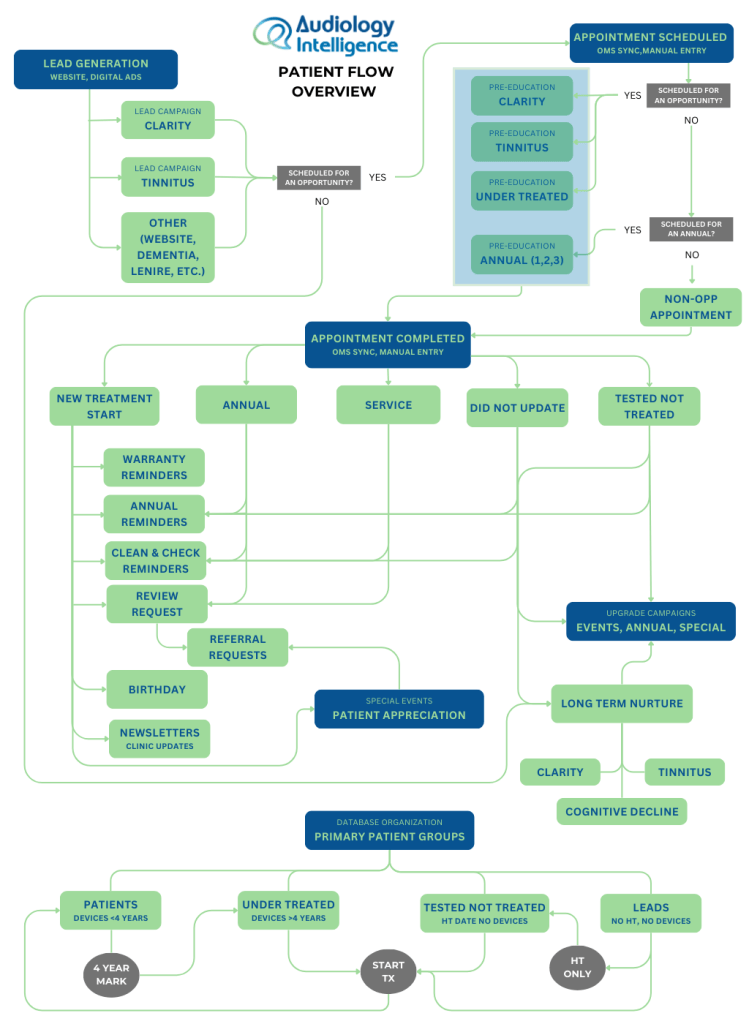
A genuine automation system doesn’t treat every patient the same. It starts by asking: why is this person coming in? Are they worried about hearing clarity? Tinnitus? Cognitive decline? Are they a long-standing patient approaching upgrade time? The answer to that question should determine everything that happens next.
Before the Appointment: The Education Sequence
When a patient schedules an opportunity appointment, the clock starts on their education — not just their reminder. Here’s what a real pre-appointment sequence looks like:
- Day 1: Welcome email and text with a personalized video from your practice explaining what to expect
- Day 3: Educational email with condition-specific content (tinnitus education if that’s their concern, hearing clarity content if that’s theirs)
- Day 4: Follow-up text checking in — did they watch the video?
- Day 7: Additional educational content progressing the conversation
- 3 days before: Appointment confirmation
- 1 day before: Final reminder
- Appointment day: Patient arrives educated, prepared, and already connected to your practice
Importantly, if a patient watches the educational video after day 1, they don’t continue getting the same reminders. The system knows. It moves on. The goal isn’t to bombard people — it’s to get them the information they need in the most efficient way possible.
Why does this matter? Research consistently shows it takes 7 to 10 years from the time someone first notices a hearing problem to when they actually do something about it. The education sequence is designed to compress that timeline — to make the case for treatment before the patient even sits down in your chair.
After Treatment Starts: The New Patient Journey
Most practices send a review request the day after treatment starts. Then they wait for the patient’s next appointment. That’s a missed opportunity.
A real post-treatment start sequence runs for 30 days and covers every gap between appointments:
- Day 1: Review request (standard, but necessary)
- Day 2: Congratulations email checking in on how things are going
- Day 3: Automated internal notification to your team to follow up by phone
- Day 5: Email — here’s where you should be at this stage of treatment
- Day 8: Automated trigger to send a thank-you card or gift (yes, automated)
- Day 10: Follow-up text
- Day 15: Educational email — addressing common questions at the two-week mark
- Day 30: Final email in the new patient sequence
- After Day 30 + positive review: Referral request
The blue-box moments — the actual follow-up appointments at day 7, 14, and 25 to 30 — are where your team steps in. Automation doesn’t replace those human touchpoints. It supports them, preps the patient for them, and fills every gap in between.
The Lead Problem: Where Most Practices Leak Revenue
All of the above assumes the patient has already booked an appointment. But what happens to the people who expressed interest and never made it that far?
This is where most practices — even ones with decent automation for existing patients — have a major gap. A lead comes in from Facebook ads, Google, or other digital channels. An email goes to the front desk. Someone calls them the next day (or the day after). No answer. They call again a week later. Still no answer. Then they forget. The lead goes cold. The ad spend that generated that lead is wasted.
Here’s the reality: leads need 7 to 12 touchpoints on average before they convert. The average practice follows up once or twice. The math doesn’t work.
What a Real Lead Response System Looks Like
When a lead comes in through any source — website, ad, referral — here’s what should happen:
- Within seconds: The lead receives the requested content (a tinnitus book, a guide, whatever they asked for) via email and text
- Within 1 minute: Your team is notified via email and text — and the lead populates automatically into a visual call pipeline
- Immediately: An open-ended text is sent to the lead to start a conversation
- After hours/weekends: An AI bot continues the conversation and can book the appointment before your team even starts their next shift
The visual pipeline piece matters more than most people realize. Rather than hunting through email threads or spreadsheets, your phones team sees every active lead in a single dashboard. They call directly from the dashboard, and when they drag a lead from “New Lead” to “Call 1 Completed,” the system automatically sends a text and voicemail letting the patient know you tried to reach them. Every call is logged. Every stage is visible.
One external phone team that trained on this system — a team that works with businesses across multiple industries — said it was the best CRM and lead management system they had ever used. That came unprompted, and it stuck with me.
3 Stats Every Practice Owner Needs to Know
Leads contacted within the first hour are 7 times more likely to convert than those reached even a few hours later.
The average number of touchpoints a lead needs before converting to a booked appointment. Most practices manage one or two.
The number of hours per week an AI system can work. Your staff works 40. That's 128 hours of coverage your team simply can't provide without automation.
Long-Term Nurture: The Patients Who Aren't Ready Yet
Not every lead converts in the first week. Not every existing patient upgrades on schedule. What happens to those people?
In most practices: nothing. They fall off the radar. In a real automation system, they enter a long-term nurture sequence.
These sequences are segmented by patient concern. Someone interested in tinnitus gets different content than someone worried about cognitive decline or hearing clarity. Each sequence includes 70-plus touchpoints and runs for 12 to 15 months, with up to five contacts per month. The content isn’t pushy — it’s educational. Testimonial videos from patients who treated their condition. Research-backed information about the risks of leaving hearing loss untreated. Content that keeps your practice top of mind until that person is ready to take action.
The goal is simple: you’re already spending money to generate these leads. Long-term nurture makes sure that money doesn’t evaporate when a lead doesn’t convert on the first attempt. And beyond your ads, where your practice is listed online determines whether that lead finds you in the first place.
AI Bots, Voicemail Campaigns, and After-Hours Coverage
AI Booking Bots
One of the most significant shifts in practice automation over the last two years is the rise of AI conversation bots that can actually book appointments. Not just send a link — have a real conversation, understand what the patient is looking for, offer available times, and confirm the booking. And as AI continues to reshape how patients search for and interact with healthcare practices, after-hours coverage becomes more critical, not less.
This is happening in audiology practices right now. AI bots are booking appointments after hours, on weekends, and during lunch breaks when no human is available. Each confirmed booking triggers a notification to the practice team. The patient gets a confirmation. No one had to be awake for it to happen.
Automated Voicemail Campaigns
One of the more underutilized tools in the automation stack is the automated voicemail drop — a pre-recorded message delivered directly to a patient’s voicemail without their phone ringing. These can be sent at scale to segments of your database: overdue annuals, old “tested not treated” patients, leads who never converted, patients approaching upgrade time.
A recent large-scale rollout for a 17-location group sent thousands of voicemails across their database over a few days. The week following the campaign, they booked 115 annual hearing evaluations — compared to their typical average of 80 to 90. That’s a 35 to 40 percent increase in booked annuals from a single automated campaign.
Upgrade and Reactivation Campaigns
Running a targeted upgrade campaign — a short, urgency-driven sequence aimed at patients approaching warranty expiration or who have been in older technology for several years — consistently generates $20,000 to $50,000 in revenue per campaign for the practices I work with. Run it two to three times a year and you’re looking at real, predictable revenue from patients already in your database.
Basic Reminders vs. Real Automation: A Side-by-Side Look
|
Feature |
Basic OMS Automation |
Audiology Intelligence |
| Pre-appointment education | Appointment reminder only | Multi-touchpoint video education sequence |
| Lead response time | Manual email notification | Instant delivery + team alert within 1 minute |
| After-hours coverage | None | AI bot engages and books appointments |
| Long-term nurture | Annual reminders | 70+ touchpoints per patient segment, 12–15 months |
| Lead organization | Email inbox / spreadsheets | Visual pipeline with drag-and-drop call tracking |
| Patient segmentation | Generic broadcasts | Segmented by tinnitus, clarity, cognitive, upgrade |
| Voicemail campaigns | Not available | Automated voicemail drops to full patient database |
| Upgrade campaigns | Warranty expiration email | Targeted campaigns generating $20K–$50K per run |
The Real Question: Do You Have a Marketing Problem or a Follow-Up Problem?
Most practice owners, when revenue slows or conversion rates drop, immediately look at their marketing spend. More ads. A better website. A new campaign. But in my experience working across the industry, the problem is rarely the top of the funnel.
It’s what happens after the lead comes in. Leads are being generated and lost before anyone picks up the phone. Patients are starting treatment and drifting because no one followed up between appointments. Patients who were ready to upgrade chose a competitor because they hadn’t heard from your practice in 18 months.
You don’t need more leads. You need to keep the ones you’re already paying for.
A real automation system — one that covers lead capture, patient education, post-treatment nurture, long-term follow-up, and AI-assisted after-hours engagement — is what makes that possible. If you’re looking at where else conversion breaks down in your practice, these five areas are worth reviewing. And when you’re ready to see what a full database marketing automation system looks like for your specific practice, the technology exists and it’s working today.
About the Author
Justin Bateman
Director & Automation Specialist, Audiology Intelligence
Justin has spent 11 years in the audiology industry — the first five as a board-certified hearing instrument specialist working directly with patients, and the last six building and refining automated marketing systems for private audiology practices nationwide. He has trained phones teams, designed multi-stage patient journeys, and worked with the first practice in the country to implement automated audiology marketing at scale. At Audiology Intelligence, he leads automation strategy and system development.

Frequently Asked Questions
Isn't my OMS already handling automation?
Your OMS handles scheduling and reminders well. But most OMS platforms are not built to manage multi-stage lead nurture, segmented patient journeys, AI-powered after-hours engagement, or upgrade campaigns. They’re practice management tools, not marketing automation systems. The two need to work together — they’re not interchangeable.
How is this different from just using email marketing software?
Email marketing software sends broadcasts. Automation systems respond to behavior — what a patient clicks, watches, or doesn’t engage with — and adjusts the sequence accordingly. If a patient watches the educational video on day one, they don’t get the day-three reminder asking if they’ve watched it. The system knows. That behavioral intelligence is what separates automation from email blasts.
Do I need a dedicated staff member to manage this?
For the patient journey and lead nurture sequences, no — those run automatically once configured. Where a dedicated person matters is on the call list side: having someone on your phones team who is responsible for working the lead pipeline each day makes a significant difference in conversion rates. The automation organizes the work for them; they just need to make the calls.
What kind of results can I actually expect?
Results vary based on your lead volume, your market, and how consistently your team works the call lists. That said, upgrade campaigns reliably generate $20,000 to $50,000 per run. Voicemail campaigns have driven 35 to 40 percent increases in booked annuals for practices with established patient databases. And AI-assisted after-hours booking is converting leads that would have otherwise been lost entirely.
Is this only for large practices?
The lead pipeline and call list tools are most impactful for practices generating consistent lead volume from digital ads. The patient journey sequences and long-term nurture are valuable at any practice size — even a single-provider clinic benefits from the education system and post-treatment follow-up. The right configuration looks different for a 1-location practice versus a 17-location group, but the underlying principles apply across the board.