
Audiology Websites & SEO
This Audiology Practice Lost 30% of Their Traffic From a Website “Refresh.” Here’s What Broke.
By Calvin Hunsaker, Audiology Website & SEO Specialist · Published 7/13/26
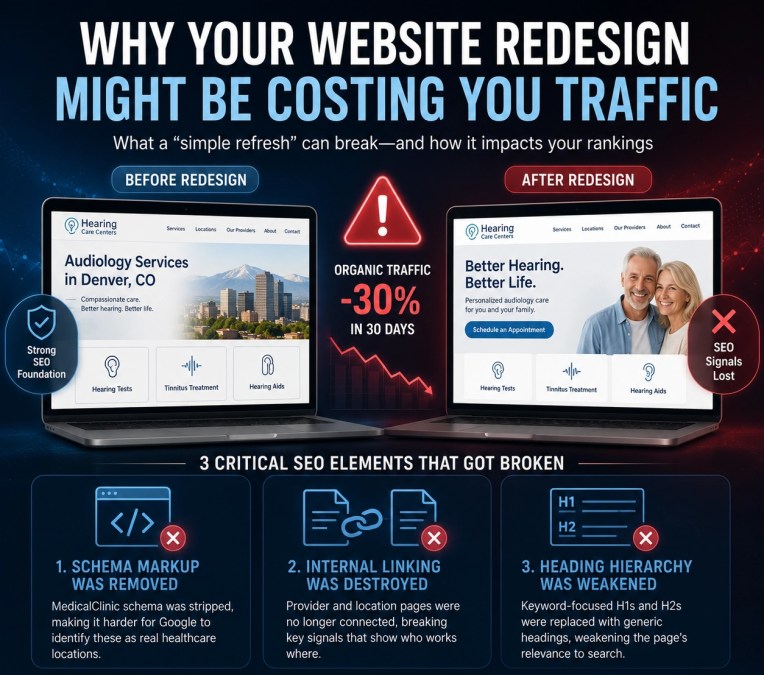
A practice reached out to us last month because their organic traffic had dropped 30% in 30 days.
They hadn’t launched a new website. They hadn’t switched platforms. They just had another agency come in and refresh the design and rewrite some of the content on their location pages.
That was enough.
The short version: This was a multi-location audiology practice. The URLs stayed the same. From the outside, everything looked fine — the site actually looked better. But under the hood, three things had quietly broken, and on location pages specifically, that was enough to cost them 30% of their organic traffic in a single month. Here’s exactly what broke, why it matters, and how to make sure it never happens to your clinic.
The Redesign That Looked Like a Win
Here’s what made this so easy to miss. Nothing looked wrong. The URLs were untouched. The design was sharper. The content read cleaner. If you were the owner reviewing the new site, you’d have signed off too.
But a website has two layers — the layer patients see, and the layer Google reads. The redesign improved the first and quietly gutted the second. Google doesn’t rank you on how the site looks. It ranks you on what it can read. That’s the whole gap between audiology website design that looks good and website design that actually brings in patients.
What Quietly Broke #1 — The Schema Disappeared
The location pages used to have MedicalClinic schema — code that tells Google, in its own language, “these are real healthcare locations, at this address, offering these services.” The redesign stripped it out.
From Google’s perspective, the practice went from clearly identified medical clinics to unlabeled marketing brochures overnight. Same words on the page, but the machine-readable label was gone. Schema is how you speak Google’s language — and it’s baked into how we handle AI SEO for audiology clinics, because that same schema feeds AI search results too.
What Quietly Broke #2 — Internal Linking Was Destroyed
The old site had a clean structure: every provider linked to the locations they worked at, and every location linked back to its providers. That link graph is a massive signal — it tells Google “these specific people work here, at this address, providing this service.”
The redesign broke it. Providers were left floating, unlinked from any location. Google lost the map. For a single-location clinic that’s bad. For a multi-location practice it’s devastating, because that structure is how Google understands which provider belongs to which location.
What Quietly Broke #3 — Headings Rebuilt for Design, Not Search
H1s that used to be keyword-anchored — like “Audiology Services in [City]” — became generic marketing headers. H2s got flattened. Google reads headings as a summary of the page’s purpose, and the summary suddenly stopped matching what patients were searching for.
The page still looked like it was about audiology services in that city. But the part Google reads first no longer said so. Good audiology SEO treats headings as ranking real estate, not just design elements.
Why Location Pages Get Hit the Hardest
Location pages are the pages Google leans on hardest to rank a local practice. They’re where your address, local relevance, and service-area signals live. Weaken the schema, internal links, and headings on those pages, and you’re knocking out the exact pages Google uses to decide whether you show up for “audiologist in [city].”
Individually, none of these three problems looks catastrophic. Together, on location pages, they were enough to drop organic traffic 30% within a month. This is the same foundation we protect in our local SEO for audiologists work — location-page authority is slow to build and fast to lose.
The Real Problem: Design and SEO Are Two Different Jobs
The agency that did the redesign didn’t do anything malicious. They probably weren’t even careless. They approached the site as a design project, not an SEO project — two completely different disciplines both wearing the “web design” label.
The lesson for practice owners: content and design updates to existing pages have SEO consequences most people never see coming. A “refresh” is not a small change. If your schema, internal links, and heading structure aren’t being actively preserved, you can lose months of ranking authority in weeks — and the site will look better while it happens.
How to Protect Your SEO During a Redesign
Planning a redesign — or just had one? Before anything goes live, confirm:
- ✓Schema is preserved. Every location page keeps its healthcare schema. Verify it — don’t assume it carried over.
- ✓Internal links are rebuilt. Providers link to their locations; locations link back to providers. Screenshot the old structure first.
- ✓Headings stay keyword-anchored. “Audiology Services in [City]” beats a clever tagline every time.
- ✓URLs don’t change — and any that must are 301-redirected properly.
- ✓You have a before benchmark. Record rankings and traffic in Search Console before the redesign to catch a drop in week one.
- ✓Whoever does the work owns SEO, not just design. Ask directly how they’ll preserve your schema, links, and headings. No clear answer is your warning.
The good news: this is fixable.
Schema can be rebuilt, internal linking restored, and headings re-optimized — rankings recover once the signals are back in place. Even better is the version where it never happens: design and SEO handled as one job. If you’re planning a redesign, or your traffic slipped after one, let’s take a look before you lose more ground.
Frequently Asked Questions
My URLs didn’t change. How could my SEO drop?
URLs are only one signal. Even with identical URLs, a redesign can strip your schema, break internal linking, and rewrite headings — all of which Google reads to rank your pages. That’s exactly what happened here.
What is schema markup and why does it matter for a clinic?
It’s code that tells Google you’re a real healthcare provider at a specific address offering specific services. Without it Google guesses. With it, you’re far more likely to show up in local and AI results.
How do I know if my redesign hurt my SEO?
Check Search Console for a drop in organic clicks and impressions in the weeks after, and compare keyword rankings before and after. No benchmark? An SEO audit can still find missing schema, broken links, and weak headings.
Can the damage be undone?
Yes. Schema rebuilt, linking restored, headings re-optimized — rankings typically recover. It just takes longer to reconstruct after the fact than to protect during the redesign.
Isn’t a nicer-looking website always better?
Not automatically. A better-looking site that loses its SEO signals can rank worse than the one it replaced — while looking like an upgrade. The goal is design and SEO working together.

About the Author
Calvin Hunsaker, B.S. Computer Science is a Website and SEO Specialist at Audiology Intelligence. He builds SEO-optimized, high-converting websites for hearing care practices across the country.
His technical background combined with hands-on digital marketing means he builds sites that don’t just look good — they rank in search and turn visitors into patients. Every site is designed with one goal: patient acquisition.